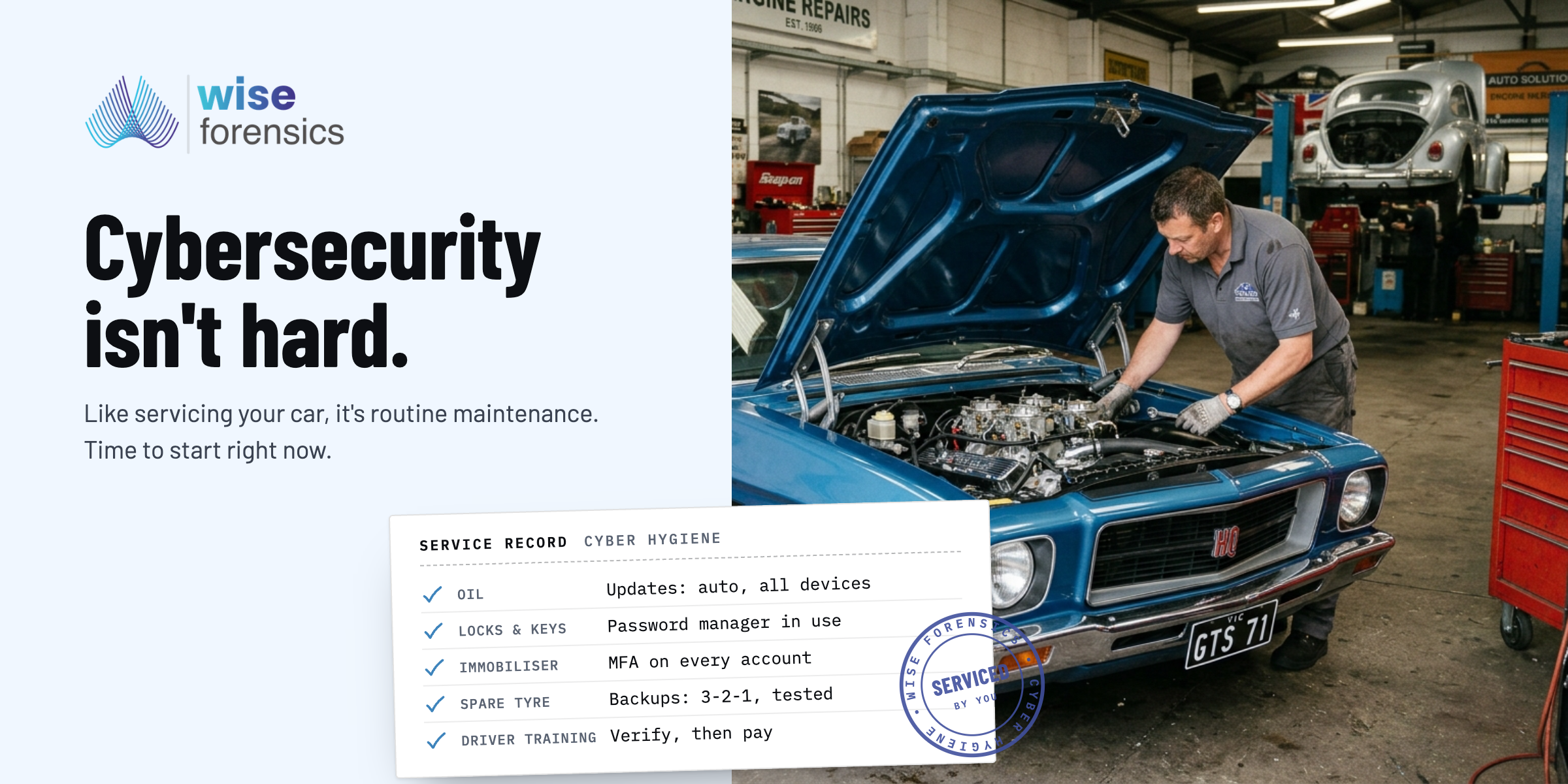
Cybersecurity isn't hard. Cybersecurity isn't exciting. Most people think the opposite of each of these statements, and that is because the media focus on the 'big attacks' as that is what drives views, and interest. Think about it, driving isn't hard. Driving isn't exciting. But when an accident happens it is all over the news, and if we weren't familiar with the exercise of driving we might think driving is best left to professionals or those with at least significant experience dealing with such events. I stand by it, cybersecurity is the same, but as it is a somewhat new term to many, we don't believe we have the skills or expertise to navigate it. We do, but we ultimately choose not to. Sticking with the car analogy, are we surprised when we buy a car, never service it, never check or change its water and oil, and then it breaks down on us? Probably not, and again, the same holds true with cybersecurity. If we don't regularly run cyber hygiene, like checking the oil (ensuring our updates have been installed) or getting it serviced (preparing your cyber incident response and running a tabletop exercise) we can expect the same failures.
We should note that whilst cybersecurity is not inherently difficult to achieve, we do need to appreciate that cyber defences are not simply a 'click away'. For many small businesses they actually aren't that many clicks away, but it is about accepting it requires some work by you, the user / business owner, to bring your cyber defences up to scratch. Some of the basic low-hanging fruit still has positive material impacts on your cybersecurity:
- Update regularly and automatically: by doing this we are closing the doors and windows to vulnerabilities, and given the pace at which they are being discovered, exploited and patched this should be set across all of your devices (not just phones and computers, but also your router and printer — anything that connects to your network) for all of your staff. Don't assume that everyone knows how to do this, is doing it. Physically show all staff (and family) members, and check regularly. Check this is happening — when you update your software and hardware you are standing on the shoulders of giants, they have provided the defences, you just need to install them.
- Deploy a password manager: Your browser is not a password manager. Don't agree? That's ok. Infostealers are prolific at harvesting credentials directly from the browser. Passwords should be secured and stored in a dedicated tool. Make sure you appreciate this, and that your staff do as well. With any cybersecurity defences, when only some people are doing it, no one may as well be doing it, as you have an unnecessary risk. There are many free and reputable password managers that you can utilise, but ensure that everyone in your team, and family, is using a password manager to generate their passwords which need to be unique (no password recycling), long (think passphrase over password) and complex (using all the character types on your keyboard).
- Deploy multi-factor authentication: When you have your accounts secured by a second factor, you decrease the reliance on your password, and therefore the risk of it being attacked. Your multi-factor authentication can be an expiring 6-digit TOTP (time-based one-time password) code, a hardware key (like a YubiKey or OnlyKey) or biometrics (using your face, thumbprint or other physical attribute to verify access) and this means that in order for your account to be compromised the attacker would need to have the password (something you know) and your multi-factor authentication (something you have / are).
- Back up: in the age of cloud solutions it can be a forgotten security element, but is still a necessary mechanism. Having your files on SharePoint, Dropbox and Google Drive (for example) is not a back up policy in its own right but should form part of a more robust strategy. The act of testing these back ups is critical too, as you need to have confidence that such back ups will stand up when needed. A worthwhile philosophy is to adopt a 3-2-1 approach: 3 copies of your data, 2 different types of media, 1 offsite, and 0 errors when you test it! You wouldn't go on a trip around Australia without a spare tyre, and you might even take more than one, just in case, and that is exactly what your back ups are.
- Undertake constant education & training: All of these defences can be weakened through social engineering, and many cyber attacks still commence with a human being compromised. In the age of AI, sophisticated phishing, vishing and smishing campaigns can all be deployed quickly and in a convincing manner. Ensuring your team (and family) are able to spot these, or are at least aware that such attacks exist and no one is immune from them is a critical step in your overall cybersecurity defensive efforts. Start small: if any supplier advises of new bank details, verify and do not make payment until you have called a number you know and received confirmation. As you take a sceptical mindset you will become more cyber aware and this philosophy will start to result in a strong cybersecurity culture.
None of these are exciting, but also, none of them cost anything significant. They can be deployed by you for your organisation and family immediately and easily. Ideally you are already doing these, and perhaps can look to explore more sophisticated defensive efforts. Whenever you do deploy a cyber defence, or process, ensure it is documented and broadcast so that everyone is aware of the requirements, and what to do. Keeping your cyber defences to yourself does not allow you to effectively defend your assets, and also inhibits staying current and improving as the landscape changes. These are defences that many places encourage, like the ASD Small Business Cyber Security Handbook, and so whilst this is nothing new, it doesn't need to be. Cybersecurity defence starts with you, and you can start right now.